The accounting agent for the books on your desk.
For accountants, bookkeepers, and business owners.
Give Memwa the financial records and a clear request. It reads the support, checks the numbers, and prepares the workbook, report, workpaper, or memo for you to review.

 Memwa
MemwaMemwa
Clients
Alder Junction Creative Studio LLC
File tree sort: Name
Files 19
Choose work to inspect
Open a file, workpaper, request draft, or source-support item from the context pane. Memwa keeps the current work in the middle pane.
Review the Q1 packet
Q1 packet review
Workpaper
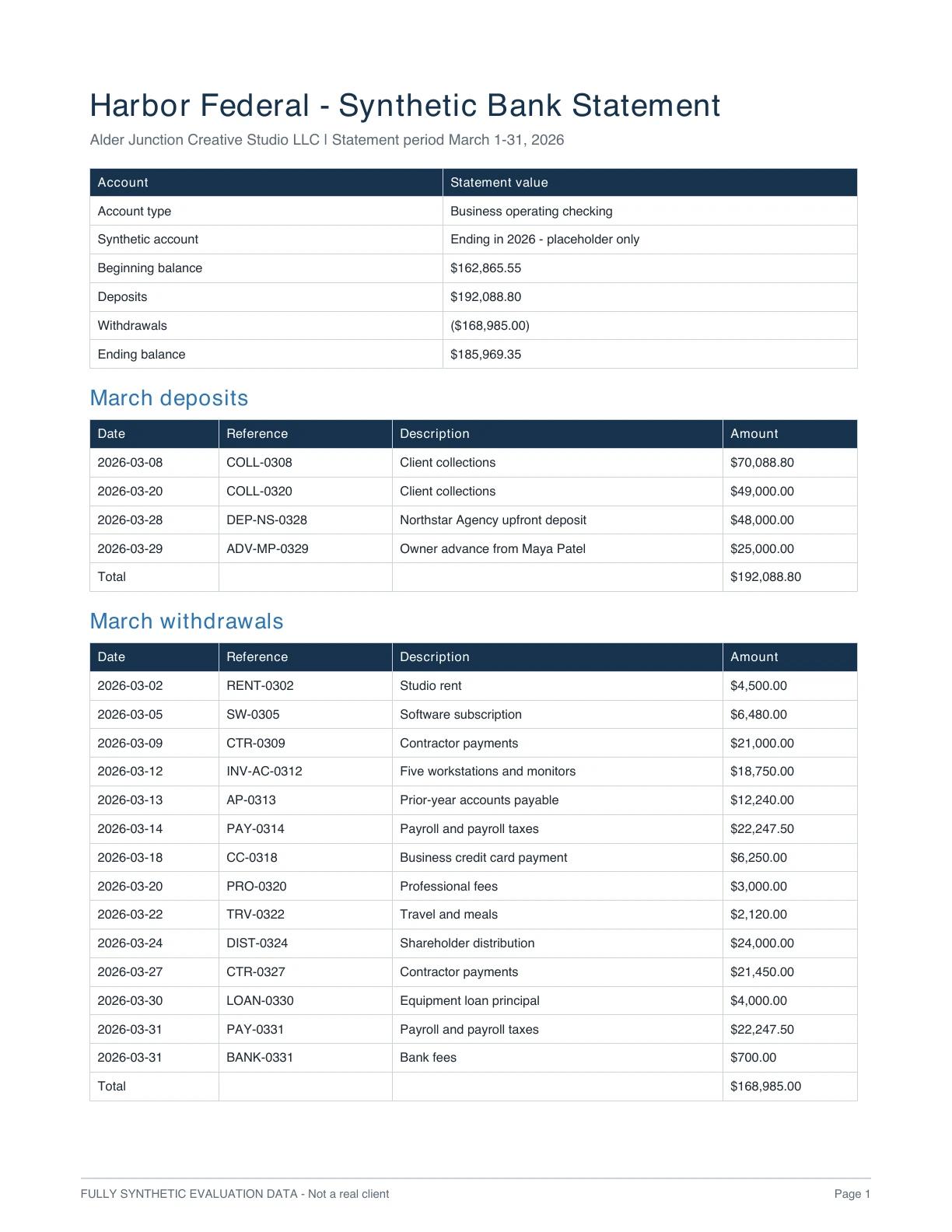
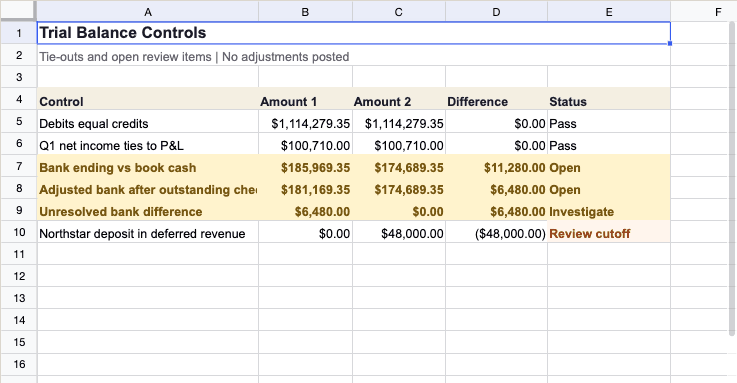
A walkthrough of one review across nineteen example accounting files. It shows the request, source review, Working, Work Journal, review workbook, open cash difference, proposed revenue cutoff, and missing support from start to finish.
What Memwa can do
One agent. The accounting work you already do.
The work on your desk, with a first pass already done. Open one to see it.
Working on your own business's books? Start here
Workflows
The checks, calculations, comparisons, and drafts behind the finished work.
The work draws on the workflows the request needs. A close review may call for a tie-out, duplicate review, variance explanation, support scan, and workbook update in the same piece of work.
Where Memwa fits
Keep the software you already use.
Your accounting software, bank, tax software, and any practice-management system or client portal remain the systems of record. The accounting work that usually happens between them is prepared in the workspace, from the files and context you bring in.
Why Memwa
Review the work instead of assembling it.
It handles the file-by-file preparation behind a close, a tax review, an analysis, or a request for records. Review trail shows what it opened, checked, calculated, researched, changed, and left unresolved, so your time goes to the decisions that need judgment.

Work in the files
Memwa works in the spreadsheet, not beside it.
Follow one source-backed spreadsheet proposal from its current value to the reviewer's decision.
Memwa| Date | Ref | Memo | Amount | Review | |
|---|---|---|---|---|---|
| 40 | 04/12/26 | 1047 | Harbor Office Supply | $286.14 | Matched |
| 41 | 04/14/26 | 1048 | Northline Utilities | $1,204.00 | Matched |
| 42 | 04/15/26 | 1049 | Uncategorized check | $3,875.20 | Review |
| 43 | 04/18/26 | ACH | City Payroll Services | $18,420.55 | Matched |
Source and workpaper
Open the source without leaving the work.
The active work keeps its supporting source one click away.

Memory
Carry approved context into the next period.
Reopen a business or a client with relevant prior work and saved decisions available when the next job calls for them.
Guidance and sources
Find the source. Apply it to the work in front of you.
Open the full sequence, from research to cited work, on the guidance page.
Review trail
See what Memwa opened, checked, changed, and left unresolved.
Follow the full path from source check to decision, including spreadsheet proposals.
Founder
Built to turn financial records into finished accounting work.
A behavioral scientist built Memwa from the work he saw inside his mother's accounting practice of thirty years.
Getting started
Start with one user and one recurring job.
Choose the weekly capacity that fits the work you expect, then open the workspace. See Pricing for the complete plan terms.
See plans and pricingStart with the work that’s waiting on you.
Start with one recurring job — a close, a tax review, a planning question, a bank-statement check, or a request for missing records — and one person responsible for reviewing the result. Choose a plan and begin; you can invite colleagues whenever you are ready.